I thought it may be useful to post summaries of what I have been reading recently. In this post, I will try to explain some basic grammar and parsing stuff in as simple way as I can (omitting all the academic complacency) .
A grammar defines a language with a set of rules of type x -> y, where x is left hand side of the rule and y is right hand side of the rule. x and y can be either expandable or literals depending on grammar type (math zealot? read terminals and non-terminals).
Chomsky hierarchy defines four levels of grammar (although these are not the only grammar types in literature but Chomsky is cool dude in linguistic literature, hence the list):
0. Unrestricted grammar:
Languages based on such grammar can have any rule for derivation (which usually means any text can belong to a possible unrestricted grammar like 'yo dawg', where 'yo dawg -> u'). However, it is possible to define a language with unrestricted grammar which is also Turing complete. A language based on unrestricted grammar is extremely difficult to parse, but not completely impossible. Such language doesn't necessarily make sense, e.g. It is possible to create a math expression such as this 1++1=1--*1=1 in an unrestricted language, as well as an unrestricted English statement such as this: "all your bases are belong to us".
1. Context sensitive grammar:
A language defined with CSG may represent all the natural languages. Such grammar is defined with a set of rules where both sides may have expandable symbols (e.g. "a" B "c" -> "a" "x" "c"). It is very difficult to build a parser which can parse CSG.
2. Context free grammar:
All programming language grammars are context free grammars. It can have only one expandable symbol on left hand side of a grammar rule and is very easy to parse. E.g. X -> "if" (y) z | "if" (y) z "else" (X), where y and z can be represented as other statements of the same grammar. There are several well known parsing techniques to parse CFGs such as:
- LL(1)-LL(k) with a recursive descent parser (top down parsers with look-aheads 1 to k) and,
- Bottom up parsers such as LR(1) and LALR which can parse more CFGs than LL parsers (generally shift reduce parsers).
LL parser starts with Left to right and always expands Left expandable symbol first (think of queue) where as LR starts with Left to right but expands Right symbol first (think of stack).
3. Regular grammar:
A regular expression is a language defined by a regular grammar. It is represented as X -> "t" | "t" Y, where Y represents expandable symbol and always follows literal (if it exists). E.g. ab*, where * may be an expandable symbol defined to mean one or more occurrence of the literal it followed as a grammar rule.
Each grammar type above is a subset of previous grammar type, meaning every regular grammar is context free grammar, every context free grammar is also context sensitive grammar and so on.
Friday, January 30, 2009
Wednesday, January 21, 2009
Mutual recursion fun with Eclipse Debug model
I rarely come across real-world data structures which are inherently mutually recursive (a.k.a. Daisy chain recursion in CS literature). Recently, while writing a plug-in related to eclipse.debug, I came across this interesting data structure.
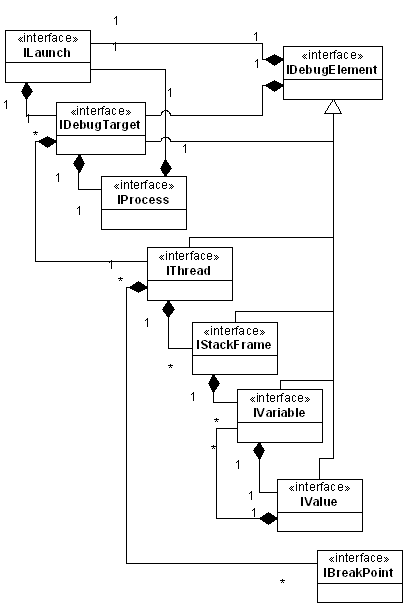 Source Eclipse.org
Observe the IVariable ←→ IValue relationship (although most relationships in this object-model is mutually recursive), given an implementation of this model (say JDI) how do you clone an object-tree representing variables on a stack-frame?
The answer is simple: assuming implementation classes Variable and Value just write a simple function to clone variables one by one:
public class Variable {Similarly for Value class:
…
private Value value;
…
public static Variable create(IVariable var) {
Variable v = new Variable() ;
try {
v.setName(var.getName());
v.setType(var.getReferenceTypeName());
v.setValue(Value.create(var.getValue()));
return v;
} catch (DebugException e) {
..
}
}
}
public class Value {
…
private  Variable[] variables;
…
public static Value create(IValue var) {
    Value v = new Value() ;
    try {
        v.setType(var.getReferenceTypeName());
        v.setValue(...);
        IVariable[] variables = value.getVariables();
        if (variables != null) {
            for (IVariable variable : variables)
                v.add(Variable.create(variable));
        }
        return v;
    } catch (DebugException e) {
        ..
    }
}
}
Statement 'Variable.create(yourJDIVariable);' clones entire JDI object. This is one of those intuitive recursion examples which you die to find out IRL. Interesting, isn't it?
This is how your regular stack-frame looks (Variables view):


Friday, December 05, 2008
Introducing PyConsole!
I have been pretty inactive this year, unlike what I planned (yawn, haven't heard from DLTK since June either) . I started learning Python earlier this year and felt the need of an embedded python shell inside Eclipse. This was something PyDev is missing [Edit: Simone pointed out that PyDev already has this neat feature, I was late to discover it] as compared to other python tools in Linux such as Eric. So I decided to write one.
PyConsole is direct result of my irregular and intermittent Eclipse development (lately), it's very simple plug-in with a basic exploit of Eclipse Console View and manages two way synchronized I/O from the python interpreter process controlled by a background Eclipse job. It provides few basic features anyone might expect from a shell such as syntax highlighting, command history etc.
Here's the code repository if anyone would like to check it out. If you have suggestions or feedback please write to me or create a bug.
PyConsole is direct result of my irregular and intermittent Eclipse development (lately), it's very simple plug-in with a basic exploit of Eclipse Console View and manages two way synchronized I/O from the python interpreter process controlled by a background Eclipse job. It provides few basic features anyone might expect from a shell such as syntax highlighting, command history etc.
Here's the code repository if anyone would like to check it out. If you have suggestions or feedback please write to me or create a bug.
tags:
Eclipse,
Open Source,
PyConsole,
Python,
Tooling

Saturday, August 16, 2008
Productive keyboard shortcuts for Eclipse Editors
I've seen very few developers using true power of Eclipse editors, so I thought of listing few very handy shortcuts that can significantly improve your source editing and navigation speed with Eclipse.
1. Ctrl + J / Ctrl + Shift + J : Inline search, meaning you can type on the fly to search text in current editor. You can use Up/Down arrow keys to navigate between matching text fragment in forward/reverse direction. This is one of the most powerful features you will find in advanced editors like Vim or Emacs.
2. Ctrl + K/ Ctrl + Shift + K : Search text in forward or reverse direction.
3. Ctrl + L : Go to line.
4. Ctrl + Alt + Up/Down : Duplicate current line above/below. Very useful in repeatative assignment statements (Java code, eh?).
5. Alt + Up/Down : Move current line up or down. Also, very handy to select current line.
6. Ctrl + . OR , : This is contextual and may be specific to Java editors: if you have error or warnings in current file in editor it will navigate to them.
All of these except for no. 6 are generic text editor features which are inherited by all eclipse text editors. You will realize that you will work much faster than average user if you start using these key bindings.
1. Ctrl + J / Ctrl + Shift + J : Inline search, meaning you can type on the fly to search text in current editor. You can use Up/Down arrow keys to navigate between matching text fragment in forward/reverse direction. This is one of the most powerful features you will find in advanced editors like Vim or Emacs.
2. Ctrl + K/ Ctrl + Shift + K : Search text in forward or reverse direction.
3. Ctrl + L : Go to line.
4. Ctrl + Alt + Up/Down : Duplicate current line above/below. Very useful in repeatative assignment statements (Java code, eh?).
5. Alt + Up/Down : Move current line up or down. Also, very handy to select current line.
6. Ctrl + . OR , : This is contextual and may be specific to Java editors: if you have error or warnings in current file in editor it will navigate to them.
All of these except for no. 6 are generic text editor features which are inherited by all eclipse text editors. You will realize that you will work much faster than average user if you start using these key bindings.
tags:
Eclipse
Subscribe to:
Posts (Atom)